
Case study
Proposal Tool Redesign
Making proposal creation easier to navigate for financial advisors
Edward Jones · Senior UX Designer · Six months

Role
Senior UX designer
Timeline
6 months
Delivery
Design complete · Implementation underway when involvement ended
Validation
Advisors clearly preferred tabs in user testing
Role
Senior UX designer
Delivery
Design complete · Implementation underway when involvement ended
Timeline
6 months
Validation
Advisors clearly preferred tabs in user testing
A more complicated decision at the starting point
Financial advisors could enter proposal creation through two different routes. The existing funnel used internal terminology that made it difficult to choose the right option, and the introduction of multiple planning groups within a client relationship added another layer of complexity. Each group could have different status and eligibility rules. The redesign needed to make those choices understandable while preserving a path for clients not included in a plan. It also had to work within the existing backend and compliance requirements.
Financial advisors could enter proposal creation through two different routes. The existing funnel used internal terminology that made it difficult to choose the right option, and the introduction of multiple planning groups within a client relationship added another layer of complexity. Each group could have different status and eligibility rules. The redesign needed to make those choices understandable while preserving a path for clients not included in a plan. It also had to work within the existing backend and compliance requirements.

The original entry point presented choices through internal goals and account structures.
My contribution
I led the entry-point redesign, partnering with a researcher to understand how advisors moved through the existing experience. I developed flows and interface concepts, progressed them into prototypes for testing, and worked with engineering, business analysis, and QA to keep the direction buildable. My responsibility included the page structure, how planning-group status and eligibility appeared, and the use of AXIOM components to support accessibility.
I led the entry-point redesign, partnering with a researcher to understand how advisors moved through the existing experience. I developed flows and interface concepts, progressed them into prototypes for testing, and worked with engineering, business analysis, and QA to keep the direction buildable. My responsibility included the page structure, how planning-group status and eligibility appeared, and the use of AXIOM components to support accessibility.
Comparing two ways to organize the choices
I explored a consolidated view that displayed planning groups and their available actions together. It let advisors compare options across groups, but it also presented several sets of eligibility information and actions at once. The alternative used tabs to keep the groups accessible on the left, with the selected group’s details and actions in the main panel. Both approaches retained an option for clients outside a plan. The tradeoff was between comparison and focus. Tabs placed some information another interaction away, but gave the selected group’s options more room and a clearer context. Advisors clearly preferred the tabbed version in user testing. That preference supported moving forward with an approach that focused the main panel on one group at a time.
I explored a consolidated view that displayed planning groups and their available actions together. It let advisors compare options across groups, but it also presented several sets of eligibility information and actions at once. The alternative used tabs to keep the groups accessible on the left, with the selected group’s details and actions in the main panel. Both approaches retained an option for clients outside a plan. The tradeoff was between comparison and focus. Tabs placed some information another interaction away, but gave the selected group’s options more room and a clearer context. Advisors clearly preferred the tabbed version in user testing. That preference supported moving forward with an approach that focused the main panel on one group at a time.
Keeping eligibility close to the action
Selecting a planning group was only part of the decision. Advisors also needed to understand which proposal scenarios applied to it. The tabbed design placed the selected group’s information, eligible scenarios, and proposal action together. It preserved access to other groups and the outside-plan path without displaying every group’s full details simultaneously. I used AXIOM components as the foundation for the interface, bringing accessibility considerations into the design while working within the firm’s existing system.
Selecting a planning group was only part of the decision. Advisors also needed to understand which proposal scenarios applied to it. The tabbed design placed the selected group’s information, eligible scenarios, and proposal action together. It preserved access to other groups and the outside-plan path without displaying every group’s full details simultaneously. I used AXIOM components as the foundation for the interface, bringing accessibility considerations into the design while working within the firm’s existing system.
Consolidated view

The consolidated view exposes several groups at once. Tabs trade simultaneous comparison for a focused view of the selected group.
Tabbed view · Selected direction
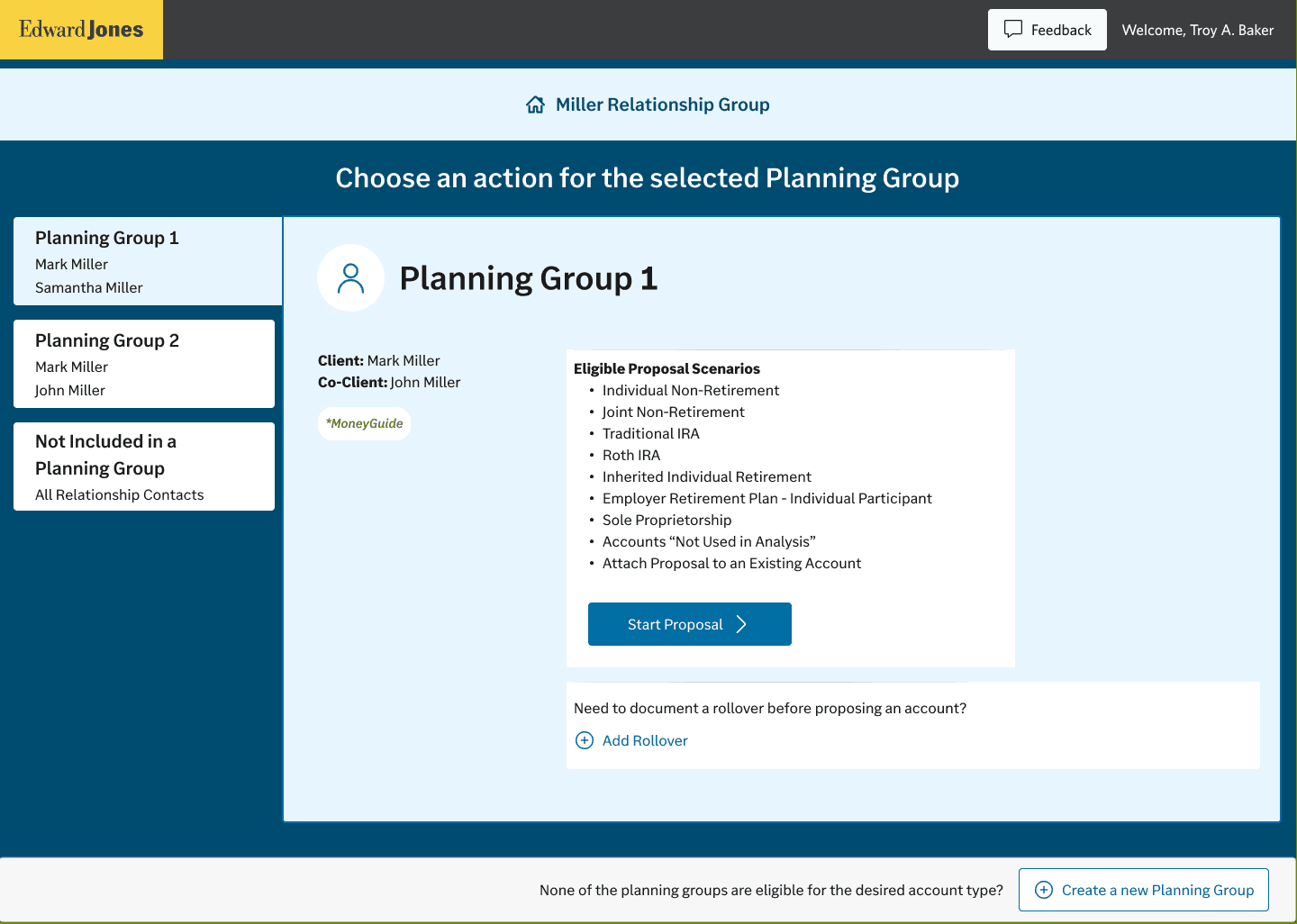
The design preserves an outside-plan option while keeping the selected group’s eligible scenarios close to the proposal action.
Outcome and delivery status
Advisors clearly preferred the tabbed version in user testing, and initial feedback on the revised experience was positive. I completed the design, and implementation was underway when my involvement ended shortly before company-wide layoffs. I don’t have visibility into the eventual release or longer-term results.
Advisors clearly preferred the tabbed version in user testing, and initial feedback on the revised experience was positive. I completed the design, and implementation was underway when my involvement ended shortly before company-wide layoffs. I don’t have visibility into the eventual release or longer-term results.
© 2026 Arman Musaji
Email:
Email: